Managed clusters · Managed Slurm
Slurm, set up and kept running for you.
Get a Slurm cluster with partitions, a login node and shared storage, then submit work with sbatch or from the console. Supergate handles the setup and the upkeep.
A cluster your researchers already know.
A login node for SSH, partitions for GPU and CPU work, and a filesystem every node shares.
 Managed Slurm cluster
Login node
- ssh
- sbatch
gpu partition
- slurm
- GPU × 8
cpu partition
- slurm
- 64 vCPU
Shared filesystem
- /home + /data
What you get.
The scheduler they already use
Researchers keep sbatch, srun and their scripts. Nothing new to learn before the first job.
Containerized jobs
Submit containerized jobs to Slurm and follow each job as its state changes, from the console or the command line.
Kept healthy
Supergate watches the cluster’s health signals and handles the upkeep, so a long run isn’t lost to a broken node. [TBD: auto-recovery]
Every job, from queued to done.
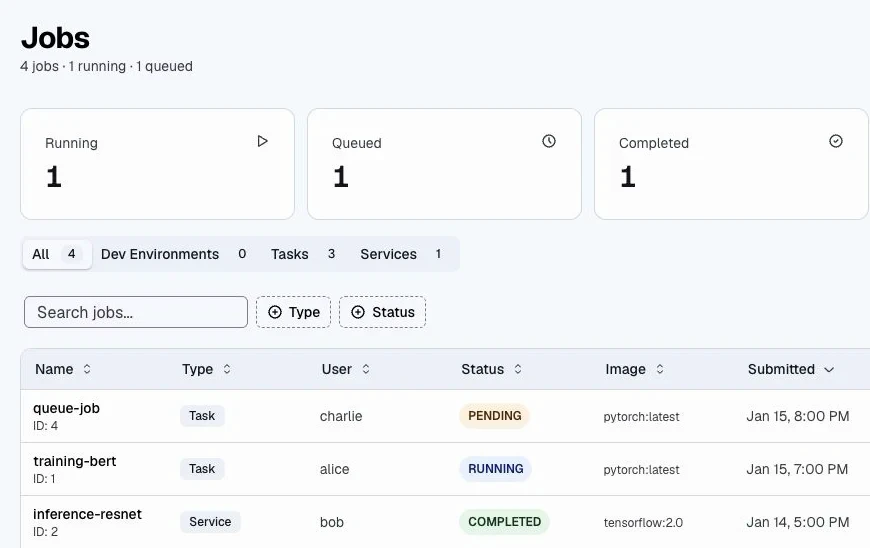
Search and filter jobs by type and status across the project, and open any one to see its metrics and logs.
Templates and scripts
Keep job templates and scripts together and reuse them for the next run.
Files in and out
Upload job inputs and download results without copying them through a login node.
Shared by many projects
Project teams submit their own jobs, each with its own roles, on clusters they share.
Questions.
Do our existing Slurm scripts work?
Yes. Partitions, sbatch options and job scripts work as they do on any Slurm cluster.
Can jobs run in containers?
Yes. Submit a container image as a job, from the console or with your scripts.
How big can a cluster get?
Tell us the node counts and accelerators you need, and we’ll size the cluster with you. [TBD: published limits]
More solutions.
- Managed clustersManaged KubernetesKubernetes clusters for containerized training, services and pipelines.
- Life sciencesBio pipelinesProtein design, sequence search and structure tools, run as pipelines without setting up each one.
- AI inferenceToken FactoryOpen models served through one API, priced per token.